Architecture
What happens in a run, how the queue watcher works, the packages and the data.
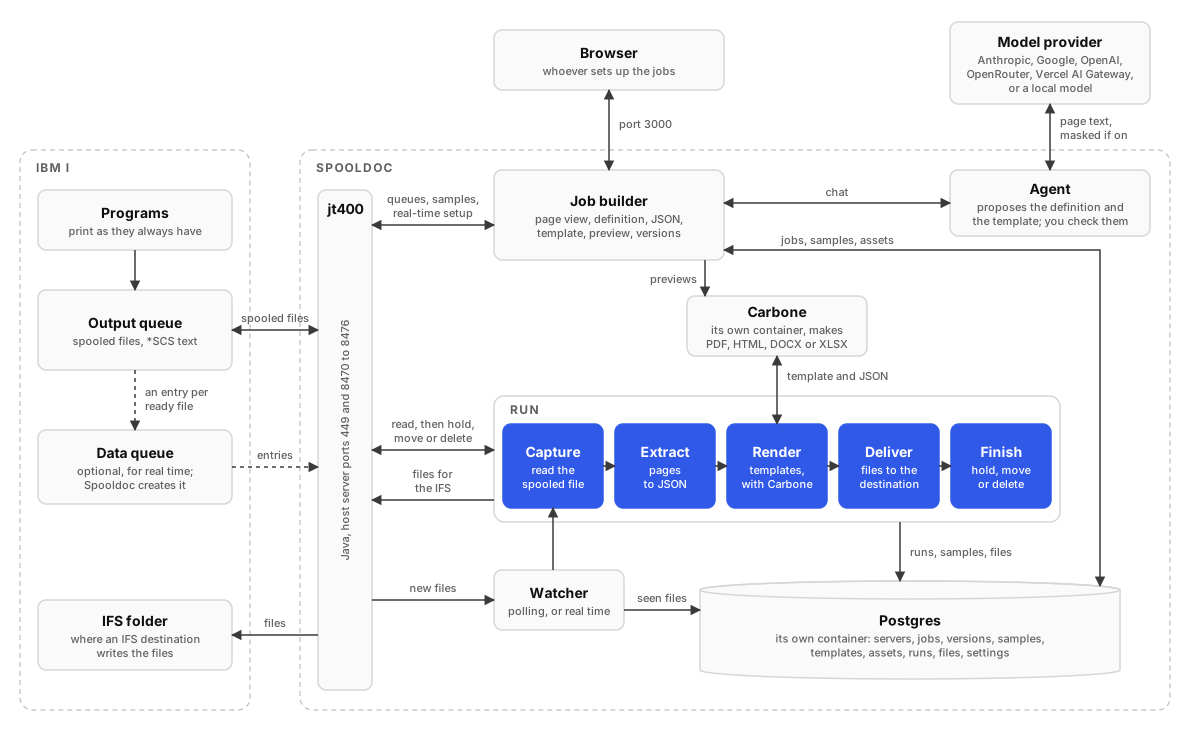
Spooldoc is one web app (Next.js) with a Postgres database. It connects to
IBM i systems through jt400, so the host needs a Java runtime; the
container image holds both. jt400 is the only way Spooldoc reaches the
IBM i, on the host server ports 449 and 8470 to 8476 (see
Deployment); the agent has no connection to it.
Documents are rendered by a Carbone server that Spooldoc
calls over HTTP: the carbone service of the Compose file, another server
of yours, or Carbone Cloud.
A run
A run takes one spooled file through the steps of a job's active version. Each step is recorded with its outcome, so the job log shows where a run stopped.
- Capture. The spooled file is read through jt400 as raw *SCS bytes
with its attributes (name, queue, user data, page size, code page) and
stored as a sample in the database. The parser splits it into pages and
lines, decoding EBCDIC with the file's own CHRID, or with
SPOOLDOC_DEFAULT_CCSIDwhen the file has none. - Extract. The definition's
matchrules decide whether the file is one the job is for; a file that does not match ends the run as skipped and is left alone. Then the fields, tables and records are read from the pages, or from the XML when the spooled file holds XML, and the pages are split into page groups. See Definitions. - Render. Spooldoc checks each template against the definition, then sends it to Carbone once per page group and format, with the page group's JSON as the data and uploaded assets written in as data URIs, or once per format with every page group for an Excel template of the whole spooled file. Carbone answers with the file: HTML, PDF, DOCX or XLSX. See Templates.
- Deliver. Every file goes to the job's destination: kept in Spooldoc's database, or written to a folder in the IFS of the job's server. See Destinations.
- Finish. Only after every document was delivered, the spooled file is held, moved, deleted or left as it is. A finish that fails gives the run the status warning: the documents are out, the file is still there.
Why JSON in between
The extract and render steps are separate on purpose. The definition
knows the page: labels, lines, columns, where tables start and stop. The
template knows the document: d.pg.invoiceNo, d.pg.lines,
formatted with formatters. The JSON between them is the contract. A new look is a new
template with the same definition; a moved column is one fix in the
definition with every template untouched. Values are typed once, the
reading can be checked on its own in the workbench and in the extraction
report, one spooled file splits into many page groups, and the same JSON
feeds every template and format. See the FAQ.
The queue watcher
The watcher runs inside the web app process (turn it off with
SPOOLDOC_WATCHER=off on all instances but one) and ticks every ten
seconds. For each job set to Watching it decides how the source queue is
watched:
- Real time. When the output queue sends entries to the server's data queue, one reader per server waits on that data queue and dispatches each new ready file at once. The queue is still polled every safety check interval (default five minutes) in case an entry was missed.
- Polling. Any other queue is listed every poll interval (default 30 seconds), newest files first.
Both paths end in the same dispatch, which runs each new file once: the
watch_seen table remembers every file a job has processed, and database
locks make sure two instances never read the same data queue or run the
same job at once. When watching starts, the job takes stock of what is
already on the queue; with Backlog on those files run too, otherwise they
are left for Run now. Once an hour the watcher also deletes runs past the
retention period, samples no job uses and old agent usage records.
Spooldoc creates and attaches a data queue only when asked, from the trigger step's Set up real-time, and never changes a queue that already sends to another data queue. See Jobs.
Packages
| Package | What it holds |
|---|---|
packages/core | Pure TypeScript, no UI and no IBM i dependency: the capture format, the *SCS parser with EBCDIC decode tables, definitions in YAML, text and XML extraction, the Carbone client with Spooldoc's tag check, Word and Excel templates (reading their tags, the starter .docx and .xlsx), starter templates, value masking for model prompts and a file workspace. Tested against the demo spooled files in packages/core/fixtures. |
packages/ibmi | Connects to an IBM i through jt400: lists output queues and spooled files with SQL services, reads a spooled file, holds, moves and deletes it, reads data queue entries and runs CL commands. The root export does not load Java; @spooldoc/ibmi/jt400 is the driver (one JVM per process, cached connections). scripts/capture.ts captures a sample from the command line. |
apps/web | The web app. lib/server holds config, the database (Drizzle schema and migrations), sign-in, the IBM i connection (ibmi.ts is the only module that loads jt400), the Carbone connection and rendering, the job runner, destinations and the queue watcher, started from instrumentation.ts. Route handlers are under app/api, the job builder under components/jobs. |
demo-spool | CL and RPG sources that create output queues and print invented documents on any IBM i, for demos and end-to-end tests. |
Data
Everything Spooldoc keeps is in Postgres, so one pg_dump is the whole
backup:
| Tables | What they hold |
|---|---|
user, session, account, verification | Sign-in (Better Auth) |
servers | IBM i systems, passwords encrypted, and the data queue Spooldoc reads on each |
queue_prefs | Hidden queues |
queue_health | Why a watched queue is polled instead of watched in real time, and since when |
jobs, job_versions | Each job's editable draft and its saved versions |
job_chats | The agent's conversation for each job |
samples | Captured spooled files: raw bytes, attributes and parsed pages, for previews and runs |
runs, run_files | Every run with its steps, and the files kept in Spooldoc: by the Spooldoc download destination, or by an IFS destination with Keep a copy in Spooldoc |
watch_seen | Which spooled files each job has processed |
destinations | Where jobs deliver |
assets | Logos, images and fonts for templates |
template_files | Uploaded Word and Excel templates. A row never changes, so a version keeps the file it was saved with |
settings, ai_providers | Intervals, retention, and the agent's model per provider with its key encrypted |
agent_usage | The agent's tokens per model step, and the cost when the provider reported one |
The server applies migrations when it starts (SPOOLDOC_MIGRATE=off to
run pnpm --filter @spooldoc/web db:migrate yourself).