Agent
The agent beside the job builder: which models it uses, what it can do and what it sees.
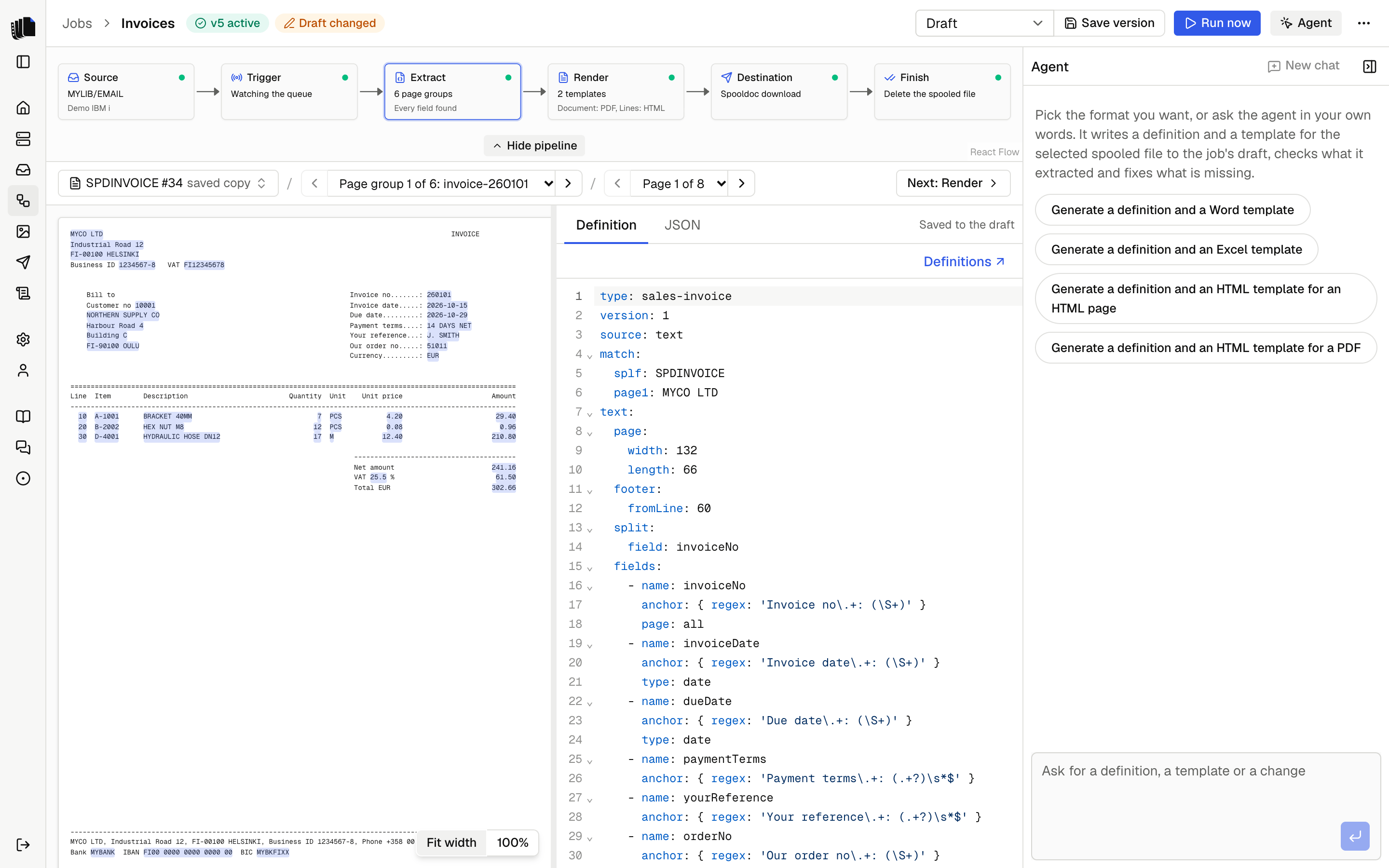
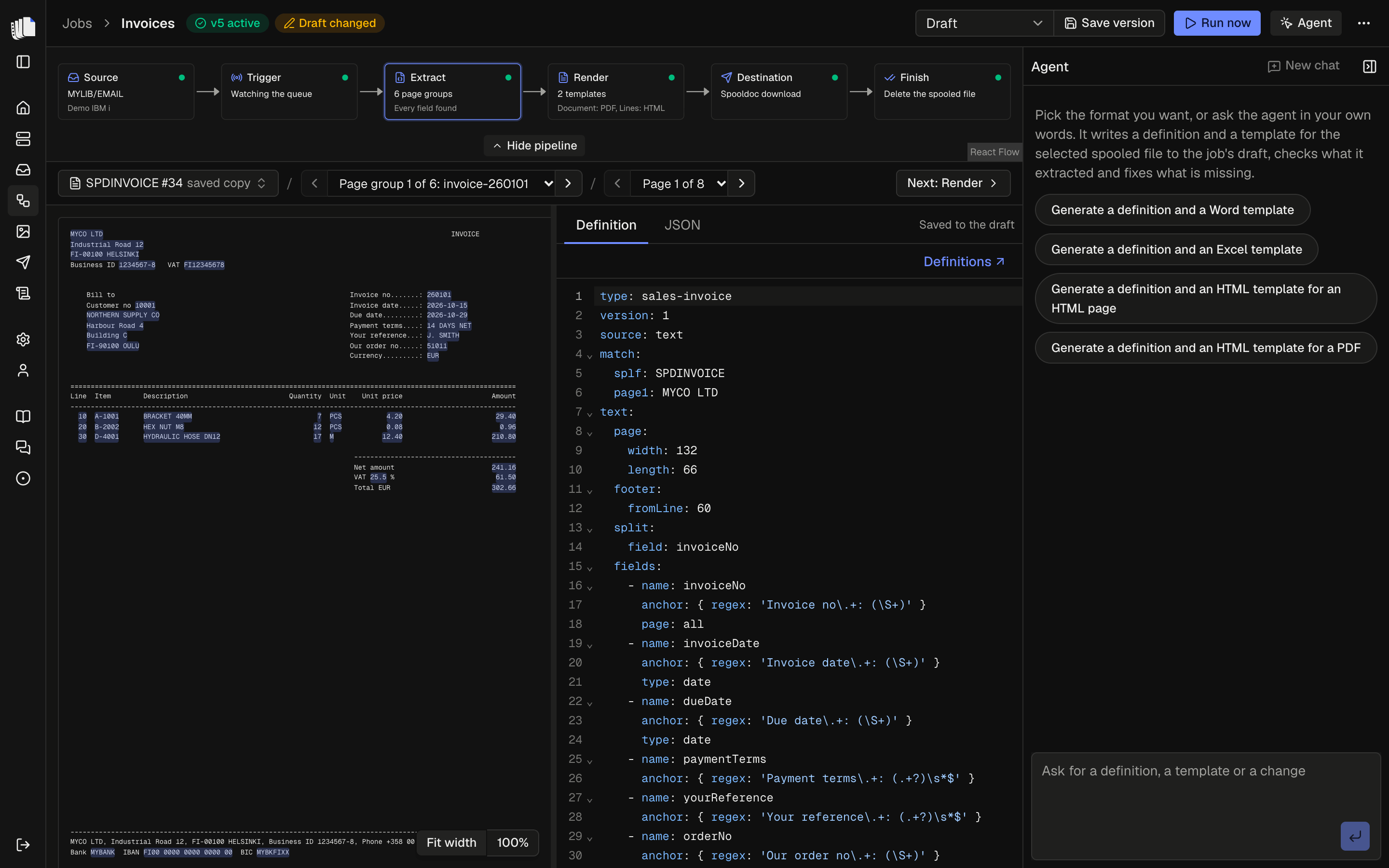
The agent sits beside the workbench in the job builder. Ask it for a definition and it reads the sample pages, writes the YAML to the job's draft, reads the extraction report, fixes missing fields, then writes a template and renders it: HTML, or a Word or Excel template it designs or edits. An empty chat offers one prompt per format: Word, Excel, HTML and PDF. Each names the kind of template, so the agent starts right away. When you write your own message and it is not clear which kind you want, it asks you first. The page view, the JSON and the preview update as it works, and everything it writes can be edited by hand. Without a model set, the job builder works as before and the agent points to Settings.
Choosing a model
Under Settings, Agent, with no restart:
| Setting | What it is |
|---|---|
| Provider | Anthropic, Google, OpenAI, OpenRouter, Vercel AI Gateway, or a local model behind an OpenAI-compatible endpoint (Ollama, LM Studio, vLLM) with its base URL. |
| API key | The provider's key, stored encrypted. Optional for a local model. |
| Model | One of the suggested models, or any model id the provider offers. |
| Effort | How much the model reasons before it answers, from None to Max, or the provider's default. Models that do not reason ignore it. |
Each provider keeps its own key, model and effort, so switching back is one click. None (agent off) turns the agent off and keeps every provider's settings. Any signed-in user can set or replace a key, but no request can read one back.
What it can do
The agent works through sixteen tools: twelve on the job's draft and its preview sample, two that read other jobs' files, one that reads the Carbone syntax reference, and one that asks you a question:
| Tool | What it does |
|---|---|
read_sample_page | Reads one page of the sample as numbered lines. The first three pages are in its instructions already. |
write_definition | Saves the definition YAML to the draft, runs the extraction on the sample and returns the report: page groups found, each field with its status, missing fields, warnings and the first page group as JSON. |
write_template | Saves the HTML of one template, the first unless it names another, checks it, renders the first document with Carbone and returns any errors, by line, and its visible text. Without a working Carbone server it only checks. It refuses a Word or Excel template. |
write_word_template | Designs a Word template and saves it as a new file the template uses. Returns what the check and Carbone find, the text of the first document and, for models that take files, the document itself. |
read_word_template | Lists the parts of a Word template (the body, headers and footers), or reads one part's XML. |
edit_word_template | Changes a Word template, yours or the starter template, by replacing text in its XML, and saves the result as a new file. Returns what write_word_template returns. |
write_excel_template | Designs an Excel template and saves it as a new file the template uses. Returns what the check and Carbone find, the computed cells of the first document and, for models that take files, its PDF. |
read_excel_template | Lists the parts of an Excel template (each sheet by name, the styles and the workbook), or reads one part's XML. |
edit_excel_template | Changes an Excel template, yours or the starter template, by replacing text in its XML, and saves the result as a new file. Returns what write_excel_template returns. |
render_preview | Renders the document of a page group with one template, HTML, Word or Excel, again after a change to the definition, and returns what the check finds and the visible text (an Excel template's by sheet and cell). An Excel template of the whole spooled file renders every page group. For a Word or Excel template it also shows models that take files the PDF. |
add_template | Adds a template, HTML, Word or Excel, with a name and formats, and for Excel what each file holds. It uses the starter until the agent writes it or you upload a file. |
remove_template | Removes a template. The last template cannot be removed. |
list_jobs | Lists the other jobs with their definition type, templates and whether those have content of their own. |
read_job_files | Reads another job's definition YAML and each of its templates, from its active version or else its draft, so a new job can start from them. |
read_carbone_reference | Reads one reference file of the Carbone syntax reference, such as the list of formatters. |
ask_user | Asks you one question with two to four answers, shown as buttons in the panel. Click one, or type another answer in the message box. The agent waits for your answer before it goes on. |
The model adds or removes templates only when you ask for it. It uses the last two tools only when you ask it to start from or reuse another job ("start from the Invoices job's template"); it adapts what it takes to the sample and saves it with the write tools. The same copy without a model is "Start from job" in the template editor's bar.
No tool reaches the IBM i, the job log or any other spooled file, and nothing it writes is a version: save one yourself when the result is right.
Questions. When something is unclear, such as where a page group starts or what a value means, the agent asks instead of guessing, one question at a time. Its answer ends there, and the question shows with its answers as buttons, the one it recommends first. Click an answer or type your own in the message box. Once you answer, the one you chose is checked and the buttons no longer send. If the answer cannot be sent, the panel shows the error; type the answer again to retry.
Which kind of template
Every kind of template makes PDF. The choice is about who edits the layout, and where:
- HTML is edited here in Spooldoc. It is the quickest to make, the preview shows it right away, and it can also make an HTML page, for example an email body.
- Word is edited in Word, by you or the agent. It can also make a DOCX.
- Excel is edited in Excel, by you or the agent. It makes an XLSX, by default one of the whole spooled file with a row per line, and can also make a PDF of it.
Once the definition reads the sample well, and before it writes the template, the agent asks which kind to make. It recommends one, with a reason from what it extracted: HTML for business documents sent as PDF, such as invoices, delivery notes and order confirmations; Word when people want to change the layout themselves, the recipient needs a DOCX, or the document is a letter with long fixed text; Excel when people want to sort, filter or sum the lines, or the recipient asks for a spreadsheet. It offers Excel only when your message points to a spreadsheet. For example: "Both make PDF. HTML is edited here in Spooldoc and can also make an HTML page, for example for an email. Word is edited in Word and can also make a DOCX. For this invoice I recommend HTML."
It does not ask when:
- your message already names a kind ("make a Word invoice", "an HTML template"),
- the template already has content of its own,
- the template is a Word or Excel template already, or its formats settle it: a template that makes HTML is an HTML template.
The agent switches a template to Word or Excel only while it still uses a starter template. A template with content of its own keeps its kind: the agent asks you to switch it in the render step, or adds a template of the other kind when you ask for one.
Word templates
Ask for a Word template ("make a Word invoice with our logo, in dark blue") and the agent designs one: page size and margins, headers and footers, a different first page, named styles, fonts, colors, spacing, borders, shaded table rows, merged cells, page numbers and the PNG and JPEG images uploaded under Assets. It then renders the first document and looks at the result, and changes the design until it reads well. Its instructions include guidance on document design: a clear order of importance, whitespace, one accent color, right-aligned amounts, and layouts that still read when printed in black and white.
It writes the design as data, in the shape of the
docx library's options, and Spooldoc builds the
.docx from it. Only the parts of the library listed in
templates are allowed, and
no code the model writes runs on the server.
To change a Word template you made yourself, it edits the file instead of designing a new one, so everything else in it stays as you made it: it reads the XML of the body, a header or a footer and replaces the text it needs to. Text Word split over several runs with the same formatting is joined first, so a tag can be found. An edit that would break the file is refused, and nothing is saved.
What it looks at. After each design or edit the agent gets the first document as it prints, as a PDF of every page made the way a run makes it. The first page of a document often differs from the rest, with the letterhead and the address on page 1 and the running header, continued table and totals after it, so it checks them all. A document of more than five pages comes as a picture of page 1, with a note to check the later pages on a page group with fewer pages. The model gets the file in the next steps of the answer it is working on, not again later, and the conversation stores only the text of the result. Models from Anthropic, OpenAI and Google take files, directly or through OpenRouter and the Vercel AI Gateway; other models, and a local model, get the text of the document only. Values in the document are masked when masking is on. Pictures, such as your logo, are as they are in the file.
Nothing is overwritten. Each design or edit is saved as a new file, and the template uses it from then on. Your earlier file is kept, and the Word panel says when the agent made the current file and offers Use previous file, or Use starter template when there was none. A saved version keeps the file it ran with.
The file is an ordinary Word document: open it in Word, change it and upload it again, or ask the agent for the next change.
Excel templates
Ask for an Excel template ("a sheet of every invoice line, to filter by customer") and the agent designs a workbook people can work in: real number and date cells, a frozen header row with a filter, column widths, fonts, fills, borders, number formats, formulas, conditional formatting, data validation, the PNG and JPEG images uploaded under Assets, and a page setup that prints every column on the page. It then renders the file and looks at the result, and changes the design until it reads well. Its instructions include guidance on workbook design: one header row to filter on, no blank rows or merged cells in the data, units in the header, and totals that do not get in the way of the filter.
It writes the design as data: a tree of sheets, cells, styles and page
setup, and Spooldoc builds the .xlsx from it. Only the parts listed in
templates are allowed, and
no code the model writes runs on the server.
To change an Excel template you made yourself, it edits the file instead of designing a new one, so everything else in it stays as you made it: it reads the XML of a sheet, the styles or the workbook and replaces the text it needs to. A sheet reads with its text in its cells, and the styles with the number of each entry, so a cell's style can be found and a new one added at the end. Spooldoc writes new text back into the workbook's shared strings, as Excel does, and every part the edit does not touch stays byte for byte the same. An edit that would break the file is refused, and nothing is saved.
What it looks at. After each design or edit the agent gets the file as a run makes it, with the formulas worked out: its computed cells by sheet and cell, with the cells that give a formula error counted. Long sheets are cut to their first and last rows. A model that takes files also gets the PDF of up to five pages. A longer PDF is made again from shortened data, the first page groups or the first lines, and a note says so and how many pages the whole file prints on. Models from Anthropic, OpenAI and Google take files, directly or through OpenRouter and the Vercel AI Gateway; other models, and a local model, get the cells only. As for Word, the conversation stores only the text of the result. Values in the file are masked when masking is on.
What each file holds is your setting. The agent designs for the one the template has. When it should change, the agent asks you first, and you change Each file holds in the template's menu. See What each file holds.
Nothing is overwritten. As for Word, each design or edit is saved as a new file, and your earlier file is kept. The Excel panel says when the agent made the current file and offers Use previous file, or Use starter template when there was none.
The file is an ordinary Excel workbook: open it in Excel, change it and upload it again, or ask the agent for the next change.
The agent writes Carbone tags. Its instructions hold
the Carbone Skill by Carbone
(Apache License 2.0) as the syntax reference. The agent can read its
reference files for HTML, Word and Excel templates, such as the
formatters, the tips on Word headers and footers and the tips on Excel
totals. The instructions also say which
Carbone features the connected server has: on the Community Edition it
leaves out Enterprise features such as :aggSum. See Carbone.
What it sees
What the model receives:
- The page text of the job's preview sample: the first three pages (up to 400 lines) in the instructions, any other page on request.
- The sample's metadata: spooled file name, queue, user data, page size and code page.
- The job's current definition, its templates with their formats and content (the text of a Word template, paragraph by paragraph, and of an Excel template, cell by cell), the names of the uploaded assets, and the Carbone edition.
- Tool results: the extraction report and the rendered text, and for a Word or Excel template, the rendered document (see Word templates and Excel templates).
- On request, other jobs' definitions and templates: layout, not customer data. Nothing else of a job (its server, destination, finish settings, runs or samples) is readable.
What it never receives: IBM i credentials, the login session, the IBM i connection, other spooled files, or the job log.
The conversation
Each job keeps one conversation with the agent, stored with the job and shown again when you come back to the job builder; it is deleted with the job. New chat in the panel header forgets it and starts another, while the definition and template it wrote stay in the draft. Only the recent part of a long conversation goes to the model with each message (the last 20 messages, within a character budget, older tool results and the model's thinking around them dropped first); the model's instructions carry the current definition, templates and sample pages, so nothing it needs is lost. The stored messages hold what the model saw, except the rendered Word and Excel documents: with masking on, the tool results are masked too.
Usage
Spooldoc counts the tokens the agent uses: one record for each model step, that is each tool call and each answer. A turn you stop, or one that fails part way, keeps the steps that finished. A step stopped before the provider reported its tokens is not counted.
- Settings, Agent, Usage shows this month and last month, in calendar months of your time zone, with a line per provider and model: tokens in (and how many were read from the provider's cache), tokens out (and how many went to reasoning), and the cost.
- The agent panel shows a line under the message box with this chat's total so far. It updates after each answer and starts again at New chat.
A cost shows only where the provider reports one with the answer: OpenRouter and the Vercel AI Gateway, in US dollars. Spooldoc has no price list, so for Anthropic, Google, OpenAI and a local model only the tokens show; an unknown cost is never shown as 0. When only some steps of a line reported a cost, no total is shown and the line says so. OpenRouter's cost is what OpenRouter charged; with your own provider key there (BYOK), the provider bills you on top. The provider's own console stays the place for the bill.
Usage records are kept when their job is deleted, and are deleted with the retention, like runs.
Masking
The model works best with the values as printed: it reads the pages, checks what it extracted and designs templates around real names, amounts and dates. That is how it works unless you turn on Mask values under Settings, Agent.
With masking on, before page text or a tool result goes to the model,
digits become 9 and letters X or x, while labels that repeat across
pages, positions and lengths stay as printed. The model sees the layout,
not the customer, and does less well with values it cannot read. What the model
writes, and the job builder itself, always use the real values.
Masking is off on a new install. An install set up before masking was a
setting has it on after the upgrade, as it was by default then; turn it
off under Settings. SPOOLDOC_MASK is no longer read, and the server log
says so when it is still set.
A hosted provider processes what it receives under its own terms. To keep the values on your network, use a local model; to send only the layout, turn masking on. A local model's base URL is called by the server, so only enter one you trust. See Security.